An update worth 1,000 words
Also, washi tape!
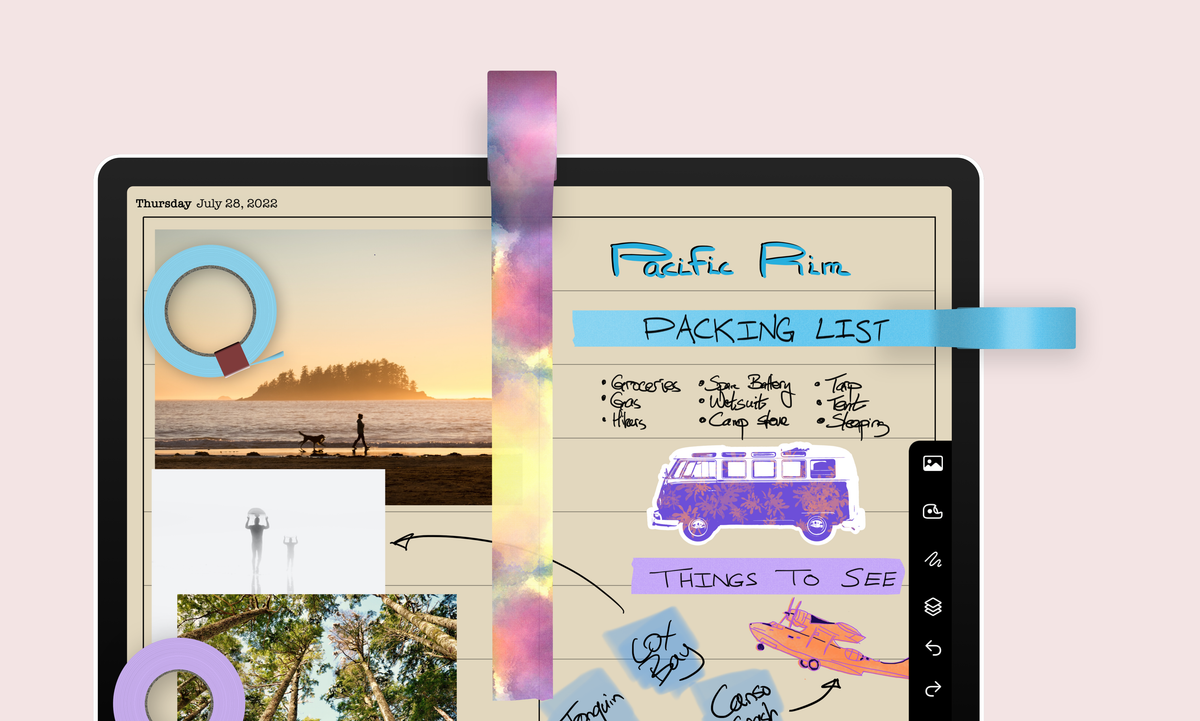
You can now add photos, stickers, and washi tape to your penbooks. This was by far our most-requested feature – well, the photos, anyway; no one asked for washi tape, but you know what they say, a customer will ask for a faster horse (i.e., photos) when what they really need is a car (i.e., washi tape).
We reorganized Penbook’s right-hand toolbar to make room for all this fun stuff. From the top:
- The photo icon inserts an image from your clipboard, your device’s photos, or Penbook’s built-in stickers
- The tape dispenser inserts washi tapes, which you can stretch and rotate
- The squiggle is where the scratchpad now lives
- The stack icon lets you reposition, rotate, resize, and delete the objects you’ve inserted
Alright, now it’s back to the code mines. It’s a tough living (not really), but someone’s got to do it (not really).
See ya later illustrator,
Team Penbook